

Command 2: the client
curl -fsSL https://raw.githubusercontent.com/eucalyptus-viminalis/create-fc/main/client/install.sh | bash -s -- http://<ip>:3381You can run this as soon as the node is catching up. install.sh clones the repo into ~/.fameboy/app, installs three dependencies (@farcaster/core, viem, @scure/bip39), saves your node's address in ~/.fameboy/config.json, and puts fameboy in ~/.local/bin. Node.js runs the TypeScript directly, with no build step. To update fameboy later, run the same command again; your sign-in is kept.
There is no npm package
npm create fc runs an unrelated package someone else published in 2022. Install with the command above.
The browser client
fameboy uifameboy ui starts a small server on your own computer (127.0.0.1:4747, or the next free port) and opens it in your browser. Your app key stays in that server; the page never sees it. It shows your own account, so it opens on a sign-in page with two ways in.
Approve in the Farcaster app. Scan a QR code and approve on your phone, so your seed phrase never leaves it. The request comes from an app account: the account the phone shows as "@name wants to post on your behalf". Set it up once on your server, in your own terminal:
ssh -t root@<ip> fc-node app-accountThen everyone using your node can sign in this way, and you can give each friend an invite code (Share your node). Or set one up for this computer alone with fameboy app-account. If it has no username, setup suggests a free @fameboy<color> with a random color, like @fameboyteal, trying another whenever one is taken; keep it or type your own. Setup also offers a display name, picture and bio for it, so the approval screen looks like an app, not a bare number.
Run it yourself
fc-node app-account asks for the app account's seed phrase. Run it in your own terminal, never through an AI assistant.
Use your seed phrase. The same steps as fameboy login, offered only because the server listens on your computer alone. Read Seed phrases first.
Sign out on the home screen deletes the app key from this computer. If you signed in with your seed phrase, it removes the key from Farcaster first.
What it shows
A bar along the bottom switches between views, by click or number key: 1 home, 2 inbox, 3 compose, 4 apps, 5 keys.
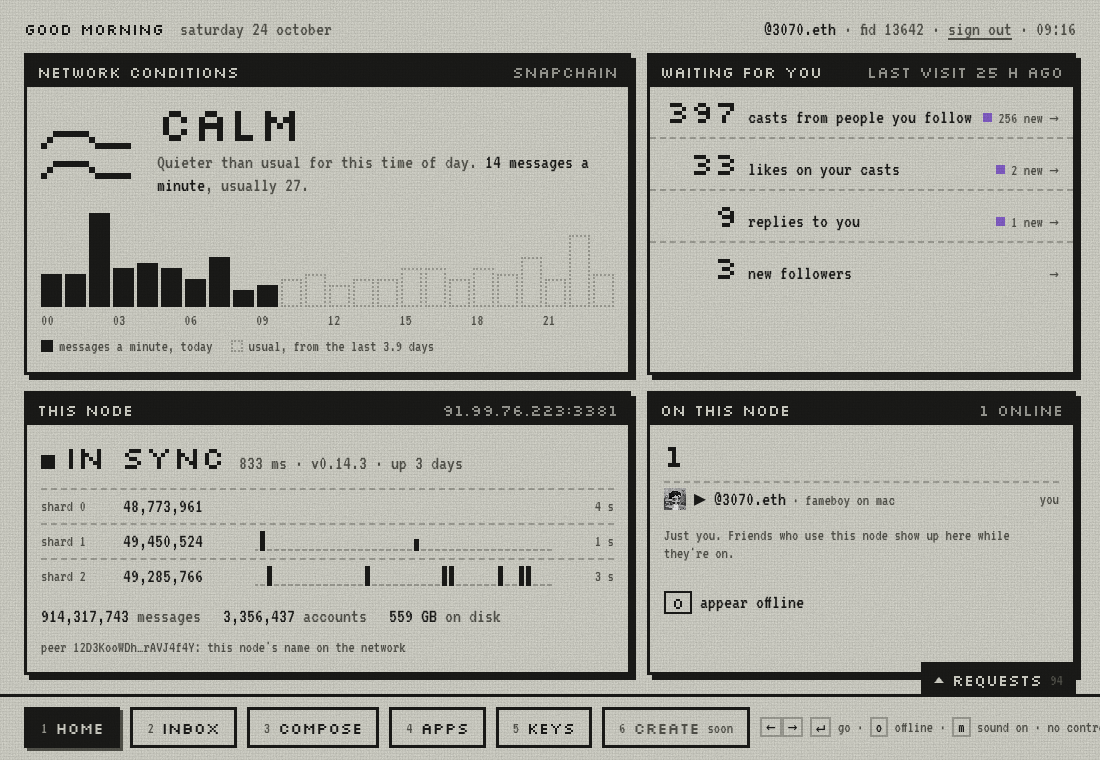
Home. How busy the network is compared with a usual day, what's waiting for you since your last visit, your node's sync status, and who else is using your node right now.
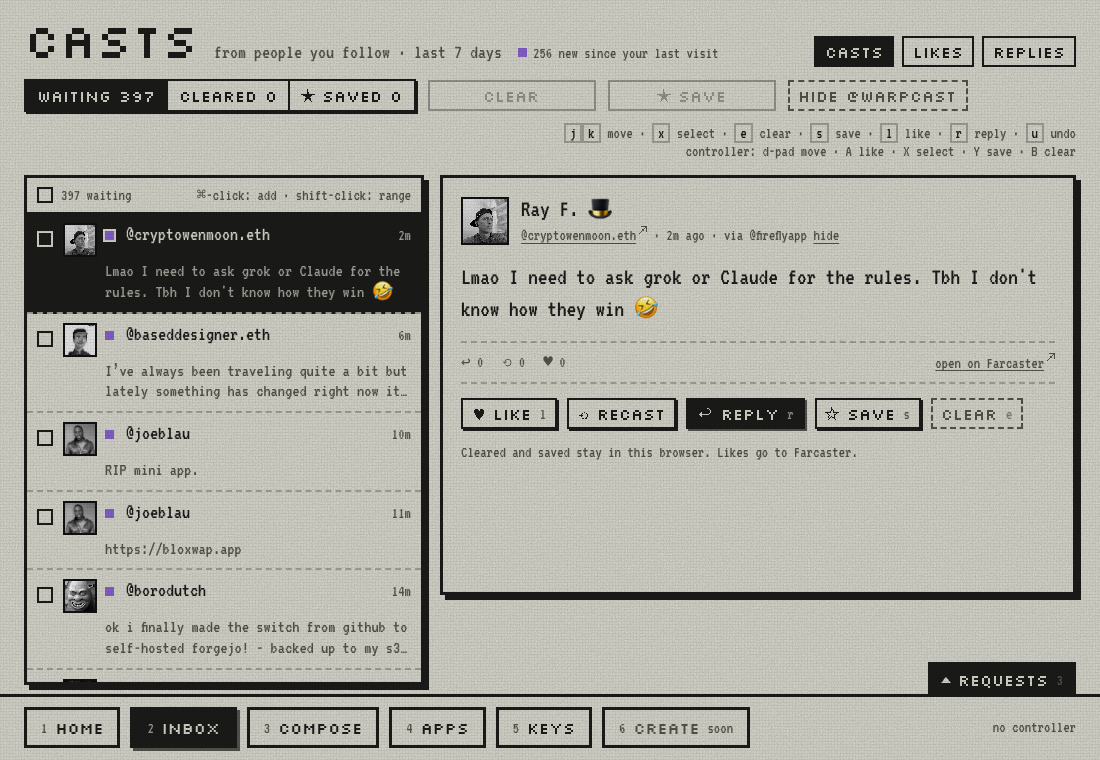
Inbox. Casts from people you follow, likes on your casts and replies to you, from the last 7 days. Clear what you've read and save what you want to keep; both stay in your browser. Every cast says which app it came through ("via @app"), with a link to hide that app.
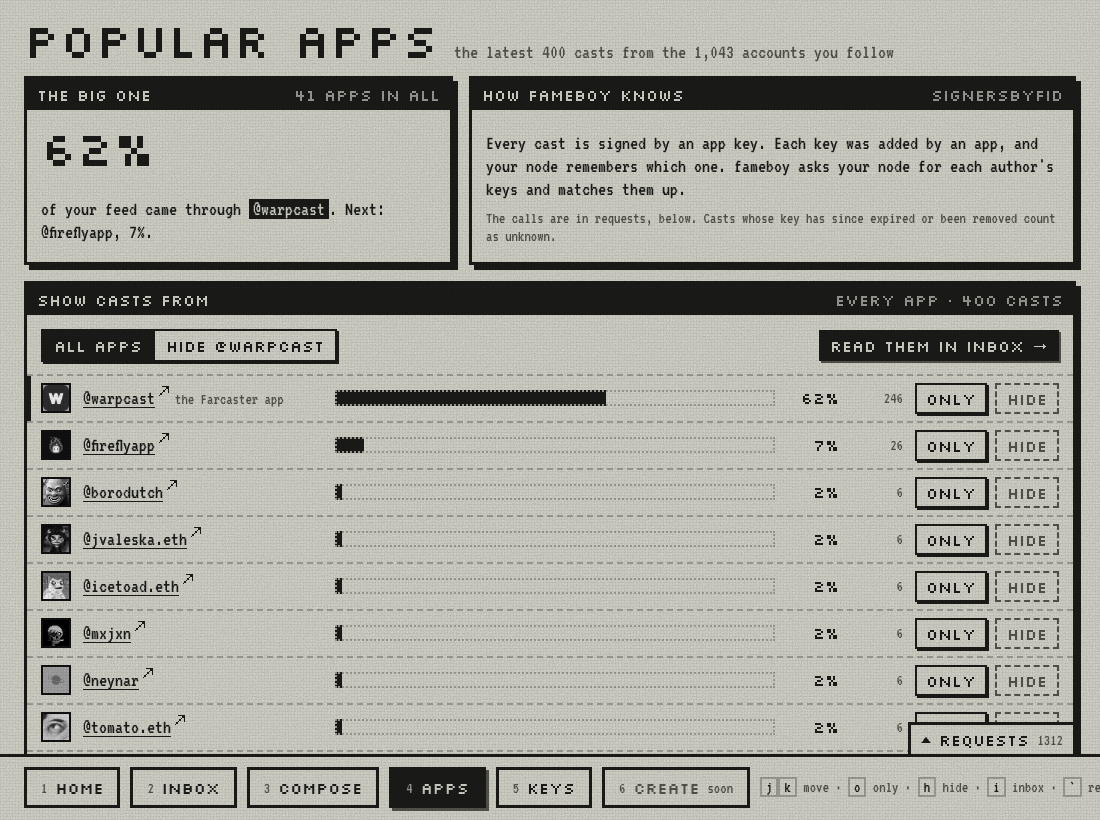
Apps. Which apps your feed comes through, as a chart. Show only one app's casts, or hide the Farcaster app (still called @warpcast) in one click. The inbox and home follow your choice.
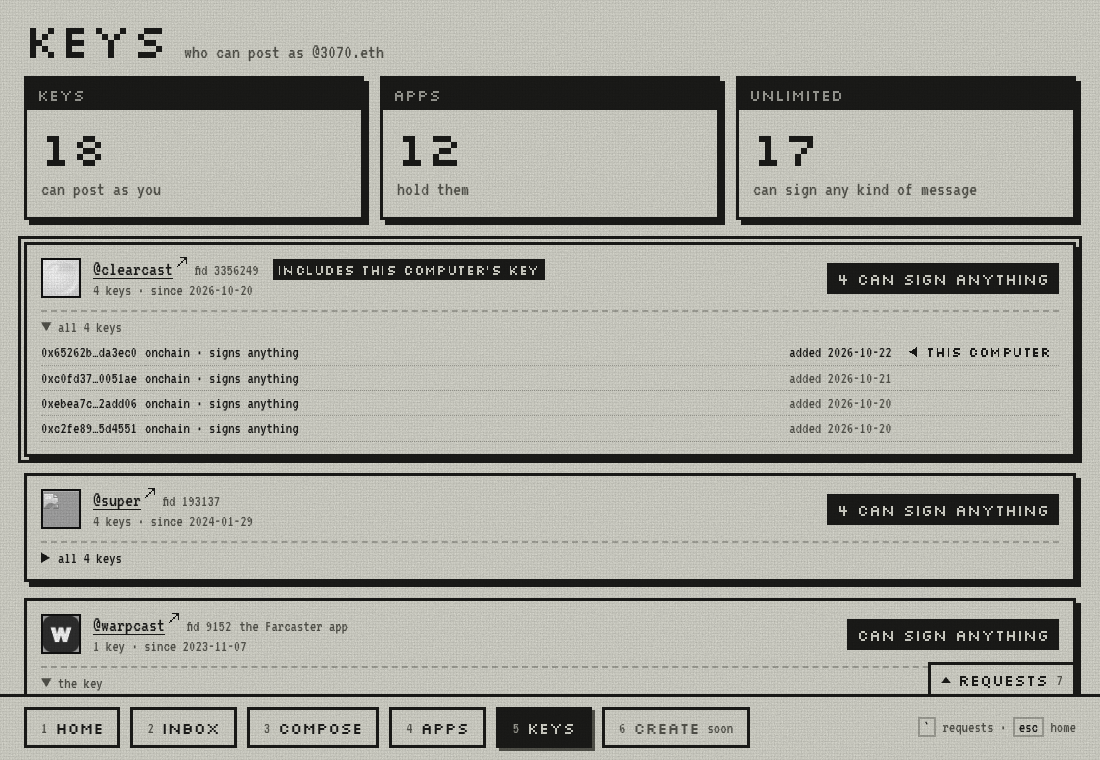
Keys. Every app key that can post as you, grouped by the app that asked for it. Old onchain keys can sign anything; gasless ones list what they're allowed to do and when they expire. The key this computer uses is marked. Your app key explains the one fameboy makes.
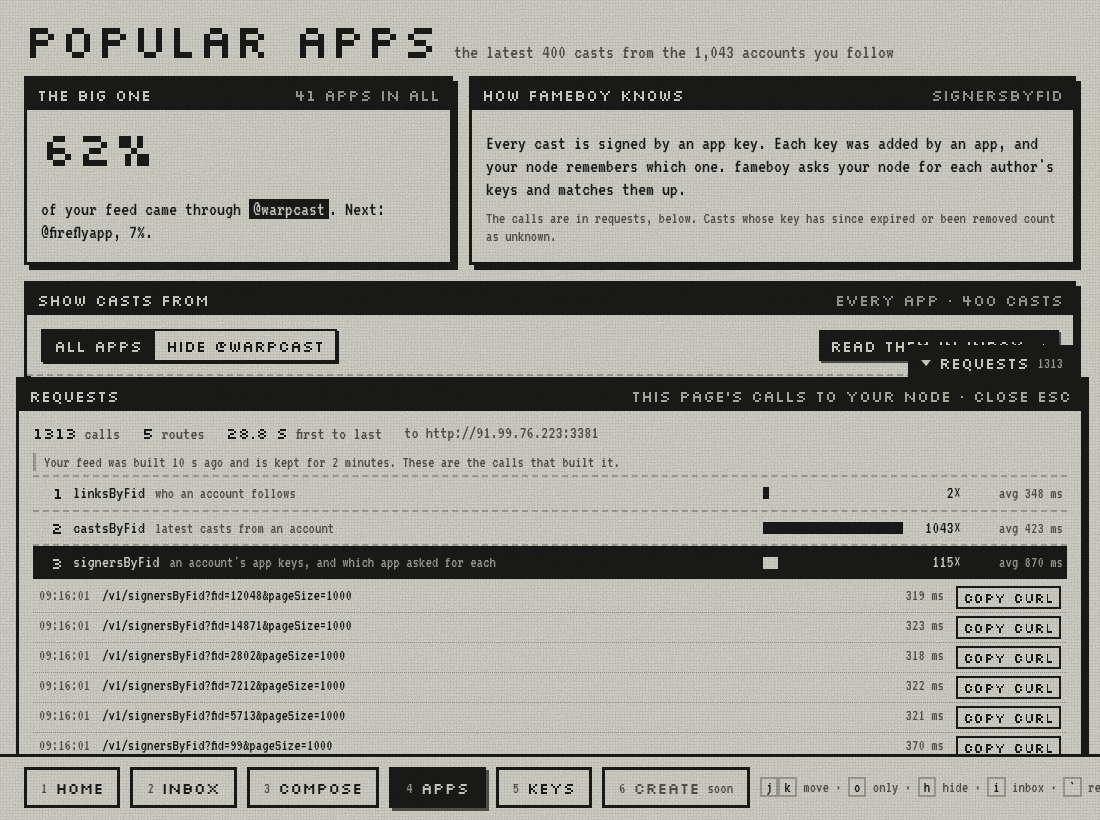
Requests. The tab above the bottom bar, on every page, opens every call the page made to your node, grouped by route. Each one has a copy curl button, so you can run it yourself and get the same answer.
Reading from the terminal
Every view above is a handful of plain GETs to your node, so you can repeat any of them:
$ fameboy casts pinkmink -n 3
@pinkmink · 1h · via @pinkmink  0xac0dd681
clear

@pinkmink · 17h · via @pinkmink  0x39d6294b
posting through a fresh create-fc node, three commands later

@pinkmink · 1d · via @pinkmink  0x085bf8a4
hello from my own snapchain read node 👋

$ curl "http://<ip>:3381/v1/castsByFid?fid=3355372&reverse=true&pageSize=3"
Snapchain has no "home feed" endpoint. A feed is something a client builds. Ours is the simplest version: ask the node who you follow, fetch the latest casts from each, and merge them by time. That's one request per account you follow. For an account following 1,041 people, the feed took 13.5 seconds from Sydney to our node in Germany, while the same 1,041 requests made on the server itself took 1.7 seconds. Running the client close to the node pays off.
One oddity: a few old casts carry timestamps decades in the future (we found one dated 2061). They would sit at the top of any time-sorted feed forever, so fameboy feed skips anything more than 10 minutes ahead.
Posting
fameboy login asks for a seed phrase once, uses it to authorize an app key for this client, and then forgets it. Read Seed phrases before you run it, and run it in your own terminal. Here's a real run:
seed phrase (hidden): ************ words
  m/44'/60'/0'/0/0  0x97547ffbA3F3e5a7553aA36948F618f39647F2Ea  fid 3355372
storage: 1 unit(s)
app key: 0xaa2778f5b991db794630e34a0e192ce1633c135786ecbadf253406938ebdcf8e
KEY_ADD: 0x23c71047ebe9209753273ca2b33c931989ddad97, nonce 2, ttl 30 days
submitted to your node, which relays it to the validators. Waiting for it to land...
done. App key saved to ~/.fameboy/appkey.json (mode 600). Your seed phrase was not saved.
Then the usual verbs. Each one is signed with the app key, sent to your node, and read back from it until it shows up. Our first writes through our own read node, and the time until each was readable again:
| Command | Confirmed after |
|---|---|
fameboy cast "hello from my own snapchain read node 👋" | 1.8 s |
fameboy like pinkmink/0x085bf8a4 · fameboy recast … | 4.0 s each |
fameboy unlike … · fameboy unrecast … | 4.0–4.1 s |
fameboy follow 13642 · fameboy unfollow 13642 | 6.3 s · 1.8 s |
@names in a cast become real mentions, --reply user/hash replies, --embed url attaches a link, and --dry-run checks the message with your node without sending it.
A write your node accepted can still go missing: a read node relays messages and keeps nothing, so if the gossip is lost, so is the message. fameboy tells you not visible on your node yet; run the command again.
Seed phrases
A seed phrase is the master key to an account. Whoever has it can post as you, move your FID to themselves, and take any funds at the custody address. Like rm -rf, it's a normal tool that's unforgiving when used carelessly.
- Prefer approving on your phone. The app shows a request, the Farcaster app approves the key, and the phrase never leaves your phone. In fameboy that's the first sign-in option above.
- Read before you paste. Only give a seed phrase to software from developers you trust, after reading what it does with it. For fameboy that's
client/src/keys.ts: held in memory, used for one signature, never written or sent. - Not through an AI's shell. We learned this one live: run through a coding assistant's shell, the account script's output, phrase included, landed in the chat transcript. Run phrase commands in your own terminal.
- No account yet?
fameboy new-accountregisters one for about $0.20 of ETH on Optimism and shows its phrase once. Add--recoverywith an address you control.
A username
fameboy username alice claims a name and sets it. It's the one step that uses a service other than your node: the fname server at fnames.farcaster.xyz, run by Farcaster, free, no key. Your custody key signs the claim, the fname server countersigns, the proof reaches the network and then your node, and only then will the node accept a message setting your username.
Filtering by the app that posted
Every cast is signed by an app key, and every app key records which app asked for it. So fameboy labels each cast with its app, and filters on it:
$ fameboy apps dwr
   1 key   @warpcast (fid 9152)
   1 key   @baseapp.base.eth (fid 309857)
   1 key   @neynar (fid 6131)

$ fameboy feed me --not-app warpcast
$ fameboy feed me --app fireflyapp --app 9152
In one account's feed of 16,416 recent casts, 89% came through the Farcaster app (fid 9152, still called @warpcast). Excluding it is a quick way to see what everything else looks like.
Hosting it for others
Most people won't run a client. Once your node has an app account, ssh root@<ip> fc-node client hosts fameboy on it at a web address named after that account, like https://fameboyteal.<ip with dashes>.sslip.io. Anyone can open it, approve on their phone, and use Farcaster through your node.
Their app key is made in their browser and never leaves it. Every cast, like and follow is signed there, and your server keeps nothing about the people who use it. A copy named @fameboy<color> takes that colour, in four shades like a Game Boy Color screen. Host fameboy for others covers your own domain, invite-only sign-in, and what people trust you with.
When you're done
Delete the server so it stops billing. See What it costs, and how to stop it.